Creating Vector Illustrations for Editorials in Adobe Fresco
Adobe Fresco is quickly becoming a go-to tool for digital illustrators, especially those working on lifestyle and editorial content. With its realistic brush engine and seamless integration with Apple Pencil, it offers a natural drawing experience that rivals traditional methods. This class, Creating Vector Illustrations for Editorials in Adobe Fresco, walks you through the entire creative process of developing trendy, versatile illustrations suitable for magazines, blogs, or any editorial platform. Whether you're an aspiring designer or a seasoned pro looking to expand your toolkit, this course provides practical techniques and real-world applications.
Understanding the Style and Appeal of Lifestyle Illustrations
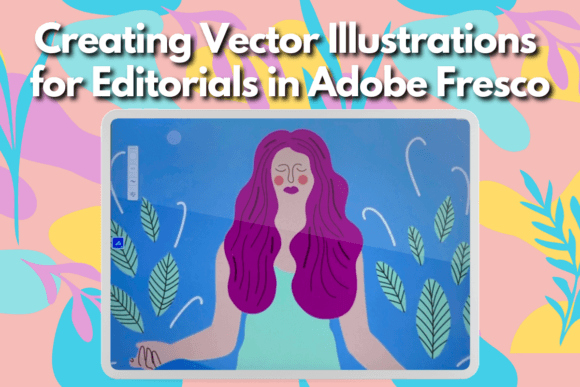
Lifestyle illustrations are all about capturing relatable moments—people enjoying coffee, reading a book, or engaging in daily routines. These images often have a soft, approachable aesthetic that makes them ideal for editorial use. The visual characteristics typically include clean lines, subtle textures, and a limited color palette to maintain clarity and focus. In this class, Anya shows how to create these kinds of illustrations using Adobe Fresco, emphasizing style, personality, and adaptability.
The appeal lies in their versatility. A single illustration can be used across print and digital formats, from magazine covers to social media posts. The key is balancing detail with simplicity so the image remains legible at various sizes. Adobe Fresco's vector-based tools allow for scalable artwork without losing quality, making it perfect for editorial projects where size flexibility is crucial.
Tracing Reference Images: A Gateway to Confidence
If you're not confident in freehand drawing, tracing is a great way to start. In this course, Anya guides students through the process of tracing photographs to build accurate base shapes. This technique helps beginners understand form and proportion while also serving as a time-saving method for professionals. Using reference images doesn’t mean copying—they’re stepping stones to creating original work that feels authentic and expressive.
Adobe Fresco’s pressure-sensitive brushes make tracing feel more like painting than outlining. You can choose from a range of brush types, including watercolor and oil pastel, to give your sketches a unique texture. This blend of precision and creativity is what sets Adobe Fresco apart from other illustration apps, especially when it comes to editorial design.
Coloring with Purpose: Limited Palettes for Maximum Impact
Once the structure of the illustration is set, coloring becomes the next step. Anya teaches students how to use a limited color palette to keep the design cohesive and professional. This approach is particularly effective for editorial work, where consistency across pages or sections is important. Choosing the right colors also affects brand perception—whether you're illustrating for a wellness blog or a fashion magazine, the hues you select should reflect the tone and message of the publication.
Working within constraints might sound limiting, but it actually encourages thoughtful decision-making. A restricted palette forces you to consider contrast, saturation, and harmony more carefully. Adobe Fresco allows you to experiment easily by switching between layers and adjusting colors non-destructively. This means you can try out different looks without starting over each time, which is invaluable when building a diverse portfolio of illustrations.
Adding Details That Delight
What makes an editorial illustration truly stand out isn't just the composition or color—it's the little details. Anya shares her insights on adding decorative elements like floral patterns, subtle shadows, and playful textures. These touches elevate the overall design and add a personal signature to your work. They also help reinforce the theme of the piece, whether it's cozy home life, urban energy, or nature-inspired serenity.
For instance, a simple scene of someone sipping coffee can become much more engaging with a few well-placed flowers or geometric accents. These details don't distract; they enhance the storytelling aspect of the illustration. In the world of editorial design, where imagery must complement text and capture attention quickly, these nuances can make all the difference.
Design Applications Across Media
One of the best things about mastering this technique is how widely applicable it is. Lifestyle illustrations created in Adobe Fresco can be used in editorial design for magazines and newspapers, as well as in web design for landing pages and blog headers. Their hand-drawn look is also popular in social media graphics, packaging design, and even logo design for brands that want to convey warmth and authenticity.
Take a look at a modern wellness brand's website. Clean, minimal layouts often feature small, stylized illustrations that add character without overwhelming the design. Similarly, print publications use such artwork to break up dense blocks of text and guide the reader’s eye. The beauty of the style taught in this class is that it adapts well to both premium font pairings and casual handwritten fonts, depending on the project's needs.
When pairing illustrations with typography, it's important to consider hierarchy and readability. If you're using a serif font for body copy, a complementary sans serif or script font can be paired with the illustrations for headlines or callouts. Adobe Fresco gives you the freedom to adjust stroke weights and opacity, allowing your illustrations to harmonize with different typefaces and design assets.
Choosing the Right Tools for Your Workflow
While the class focuses on Adobe Fresco, it's worth noting that similar techniques can be applied in other illustration programs like Procreate. However, Adobe Fresco’s vector capabilities offer distinct advantages, especially if you plan to scale your illustrations for commercial use. The ability to export in SVG format ensures your designs remain editable and crisp, no matter the output size.
If you're new to digital illustration, Adobe Fresco is user-friendly yet powerful enough for advanced users. Its interface is intuitive, with tools arranged in a way that mimics physical art supplies. For those who prefer raster-based tools, Procreate is still a solid option, though the final output may require additional steps to convert into scalable vectors. Either way, the principles covered in this class—like composition, color theory, and layer organization—are transferable across platforms.
Testing and Refining Your Illustrations
Before finalizing your work, it's essential to test how it performs in different contexts. Will it look good on a mobile screen? How does it scale down to a thumbnail? These questions are critical in editorial and branding environments where visuals need to be consistent across devices and formats. Anya encourages students to review their illustrations in multiple viewports to ensure readability and visual impact aren’t lost at smaller sizes.
You can also experiment with font pairings using mockups. Try placing your finished illustration beside a modern typography layout or a classic serif headline. Observe how the two interact—do they clash or complement each other? This kind of hands-on evaluation is part of what makes this class so valuable. It teaches you to think critically about how your illustrations function within a larger design ecosystem.
Commercial Licensing and Professional Use
For designers and creatives looking to monetize their work, understanding commercial licensing is vital. Adobe Fresco integrates with Creative Cloud, which means your files can be shared directly with clients or collaborators who use Adobe software. The class touches on how to prepare your illustrations for client delivery, including exporting options and file optimization for both print and digital use.
If you're using third-party brushes or design assets, always check their licensing terms. Some resources are free for personal use only, while others require attribution or a paid license for commercial projects. As a professional illustrator, maintaining legal compliance is part of building trust with publishers, marketers, and entrepreneurs who rely on your work for their brand identity.
Building a Portfolio with Real-World Value
By the end of this class, students will have a strong foundation in creating lifestyle illustrations that can be showcased in their portfolios. A well-curated portfolio featuring editorial-style artwork can attract clients from publishing houses, marketing agencies, or even indie bloggers looking for custom content. Each illustration tells a story, which is exactly what editors and content creators need to engage their audiences.
Consider adding examples of how these illustrations can be adapted for different themes—like seasonal changes or mood variations. Showcasing your ability to pivot styles while maintaining a consistent voice is a huge asset in the design world. Whether you're illustrating for a travel magazine or a home decor blog, having a range of visual solutions proves your versatility and professionalism.
In addition to client work, these illustrations can serve as gifts or promotional materials. Imagine creating a personalized illustrated card for a friend or designing a branded gift for a small business launch. The skills learned in Creating Vector Illustrations for Editorials in Adobe Fresco open doors to both personal and commercial creativity.
Final Thoughts on Editorial Illustration in Adobe Fresco
Editorial illustration is more than just decoration—it's a strategic element of content creation. When done well, it enhances brand perception, supports visual hierarchy, and boosts audience engagement. This class equips you with the knowledge and confidence to produce illustrations that resonate with readers and fit seamlessly into editorial layouts.
Whether you're aiming to strengthen your brand identity, improve your illustration portfolio, or simply explore a new creative hobby, Adobe Fresco offers a flexible and powerful platform. With Anya’s guidance, you’ll learn how to combine technical skill with artistic flair to create illustrations that are both functional and beautiful. And remember, the same principles apply even if you're using another app—what matters most is how you bring your ideas to life.
Ready to dive into the world of editorial illustration? Start with a clear vision, a reliable reference, and a bold yet balanced color scheme. Let Creating Vector Illustrations for Editorials in Adobe Fresco show you how to turn everyday scenes into compelling visuals that speak volumes.